 webCOMAND Docs
 API Reference
 PHP API
 io_comand_file
- ⌂ File
- Content Types
Archive File Extractor Content Type
Defines an archive file, like a zip file, and rules for how and where to extract it's contents.
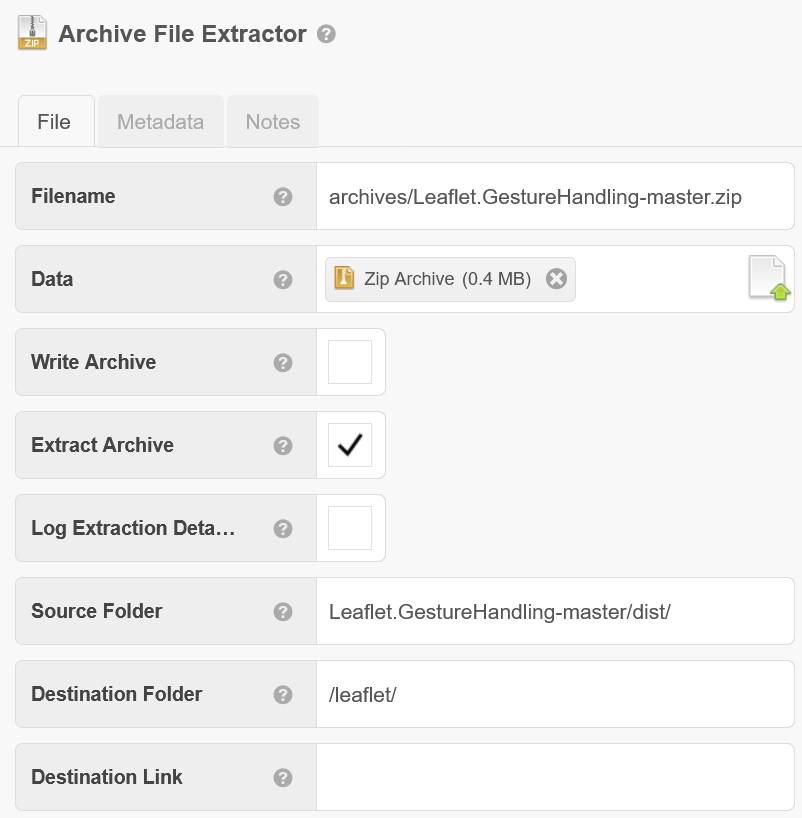
Fields
- File
- Filename - A filename, with an extension, and optionally also with a relative path (where relativity is defined by the context of this file content).
- Data - The binary data of the file.
- Write Archive - When checked, the archive file will be written on approve or publish based on the Filename.
- Extract Archive - When checked, the Source Folder and/or its contents will be extracted to the Destination Folder.
- Log Extraction Details - Log a notice about each extracted file.
- Source Folder - Optional slash-separated path within the archive where the source files should be extracted from, upon approve or publish. If blank, folders and files will be extracted from the root of the archive. A final slash will extract files within the preceding folder to the Destination Folder. No final slash will extract the preceding folder into the Destination Folder. For example, "src/" will extract the contents of the src folder within the archive to the Destination Folder. "src" without the final slash will extract the src folder within the archive to the Destination Folder, so the destination folder will contain the src folder, which will in-turn contain any contained files and folders recursively.
- Destination Folder - Path to where the Source Folder and/or it's contents within the archive will be extracted upon approve or publish. Include leading slash or ../ if it will be above the Filename path. A trailing slash is not required.
- Destination Link - Optional path to an extracted folder or file within the archive that a #LINK() to this Archive File Extractor should link to instead of the archive itself. The path must be the destination of a file that will be extracted, otherwise it can't be linked because nothing will publish.
- Metadata - Inherited from File.
- Description - A brief description of the file.
- Data Format - The data format of this file.
- Auto Detect - Whether the data format should be auto-detected from the data field.
- Notes
- Notes - Place for notes about the archive and how it is extracted.
cTemplates
Most cTemplates are inherited from File.
- Data - Overrides the standard Data cTemplate that normally outputs the file contents to instead follow the rules defined with the Fields above to extract the files in the archive, and optionally also write the archive itself. This is used when the file is written from a Package or Publication.